Opera did a very practical thing this time - soldering the AI assistant directly into the browser
Have you ever encountered such a situation——
I am using a browser to view a webpage and would like AI to analyze its content, or I would like it to summarize, translate, or write something for you. But you have to switch to another window, open ChatGPT or Claude, copy the webpage content, paste it, ask questions, get the answers, and then switch back.
Three or four times back and forth, the rhythm was completely interrupted.
The new feature launched by Opera on April 17th is designed to address this issue.
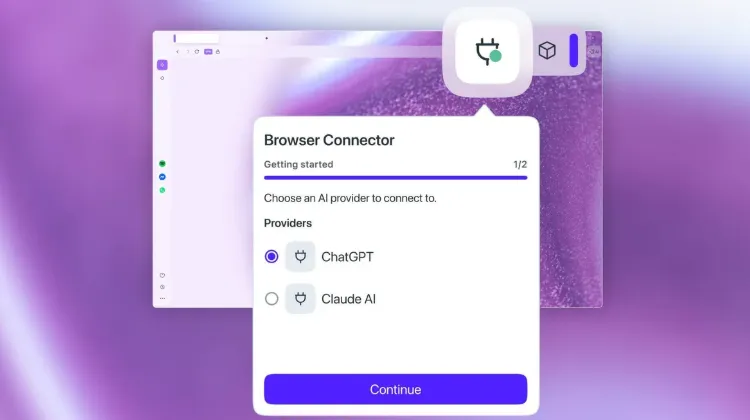
What is Browser Connector?
Simply put, Opera has added a "plug" to the browser, allowing you to directly connect external AI tools for use.
Opera One and Opera GX users can now connect to AI tools through the MCP (Model Context Protocol) protocol in their browser. Currently, OpenAI's ChatGPT and Anthropic's Claude are supported for access.
MCP is an open standard developed by Anthropic with the aim of establishing secure bidirectional connections between AI models and external tools. It can be understood as a "universal plug protocol" - no matter which AI company you use, as long as it supports MCP, it can be integrated with various tools and applications.
The gameplay of Opera this time is: you find "AI Service" in the browser settings, install the Browser Connector function, and then connect to ChatGPT or Claude. Afterwards, when you browse the webpage, AI can obtain the contextual information of the tab page and page content that you are currently opening, and provide you with direct assistance.
It sounds great, but what does it actually feel like to use it?
The most valuable scenario is context aware.
Previously, when you asked an AI a question in the browser, you had to manually copy the webpage content to the AI. Now it's no longer necessary - AI knows directly what page you're looking at and can analyze, summarize, and ask questions about the current content for you.
For example, you are looking at a product on an e-commerce website and want AI to help you compare the parameters of several different brands. Select these tabs and let Claude analyze them for you. The AI will directly read the content of each page and generate a comparison table for you. The entire process does not require copying or pasting anything.
This is the value of 'context aware' - AI can 'see' what you are looking at, rather than what you are feeding it.
What does Opera want to do this time?
Mohamed Salah, Senior Director of Product at Opera, has put it bluntly: "Through browser connectors, Opera ensures that users are no longer limited by a single company's ecosystem, but can freely combine the tools that best suit their needs. ”
The translation of this statement is: Users do not need to switch browsers just because they want to use a certain AI tool, nor do they need to switch back and forth between multiple AI tools. Opera has set up a 'plug', you can connect any AI you want.
From a business perspective, this is actually Opera's positioning in the AI era - it does not make its own AI models, but has found a starting point in "making it more convenient for users to use AI".
In fact, Opera introduced MCP compatibility in its subscription based AI browser Opera Neon last month. This time, the ability has been delegated to the free versions of Opera One and Opera GX, indicating that they plan to make this feature a standard feature for the browser.