Are you still troubled by the need to generate emails and blogs on ChatGPT and then copy them to Word for formatting? Now, this tedious operation is about to become a thing of the past!
According to technology media BleepingComputer on December 25th, ChatGPT is quietly ushering in a revolution in interactive experience, launching a new feature called "Forming Blocks" in batches. Isn't this the gospel of the vast majority of writers?
Previously, although the quality of long text generated by ChatGPT was high, the presentation format was very simple, only plain text. Users have to manually copy them into tools such as Word and Google Docs, and then perform secondary typesetting, which is so troublesome!
Nowadays, the new feature recognizes content as "formatted documents", no longer just regular conversations. When it detects that you are drafting an email or writing an article, it will automatically generate an interactive rich text box. Compared to the tedious operations of the past, is it much more convenient now?
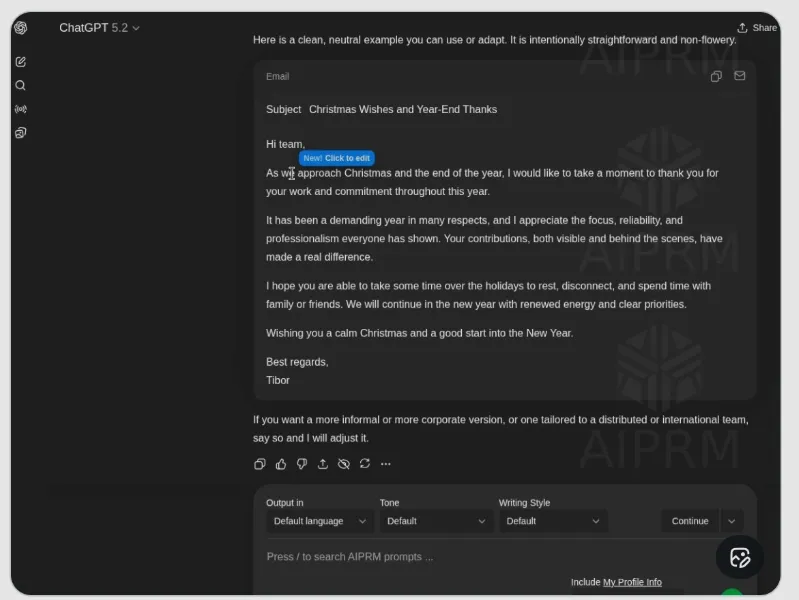
The changes brought by the new features are not just a little bit. After the system automatically generates interactive rich text boxes, users only need to highlight the selected text, and a mini toolbar similar to Gmail or Microsoft Word will appear. In this toolbar, you can directly perform various layout operations.
For example, adjusting font styles such as bold, italic, and underline as desired; Paragraph formatting is no problem, with easy handling of bullet points, numbering lists, and reference blocks; There are also quick typesetting operations, such as alignment and indentation, which can be completed with just one click.
It is worth mentioning that this update also fully considers users' usage habits. Its interaction logic is completely benchmarked against mainstream editors that users are already familiar with, and the learning cost is almost zero. For users who frequently use ChatGPT to write business emails, social media copy, or content drafts, this is simply a tool for improving efficiency, greatly reducing the breakpoints of "generate copy paste layout" operations and making the creative process more coherent and smooth.
At present, this practical feature is officially launched in stages for some Plus and Pro users and has not yet been fully opened. But don't worry, OpenAI has already revealed its future upgrade plans.
They stated that they will upgrade the functionality to support more complex document elements such as tables, code blocks, and image embeddings, and will also adapt to more content scenarios, such as resumes, PPT outlines, academic papers, etc., which can be easily handled. Imagine how convenient it would be to be able to write and layout various documents using ChatGPT in the future!
In today's increasingly fierce AI competition, major manufacturers are competing for model capabilities, while OpenAI is focusing on user experience. This update may seem small, but it is actually a crucial step in OpenAI's transformation from a "conversational AI" to a "productivity platform".
When ChatGPT can not only write high-quality content, but also "arrange well and make changes quickly", it is no longer just an auxiliary tool, but has become the core editor of digital workflows. This kind of "moistening things silently" interactive optimization may be more effective in retaining users' hearts than parameter growth.
Rich text editing, in simple terms, is the ability to give text rich formatting and styles. It can make the text no longer monotonous, highlighting key content through bold, italic, underline and other methods; Make information more organized through bullet points and numbered lists; Use reference blocks to make the referenced content more prominent.
When writing structured content such as emails, blogs, reports, etc., rich text editing can make documents more beautiful and easy to read, enhancing the effectiveness of information communication. That's also why ChatGPT's launch of the "formatting module" feature has received so much attention.
In short, the interface upgrade of ChatGPT on December 25, 2025 undoubtedly brought great convenience to the vast number of users. Let's look forward to more powerful features in the future together!