For a long time, when using AI assistants to process files, users have generally faced an awkward reality: uploaded documents, images, and data are always firmly "trapped" in a specific dialogue window. Once a new conversation is initiated, it needs to be re uploaded, and repeated operations waste time and disrupt the work rhythm. OpenAI has clearly noticed this long-standing pain point and proposed an ambitious solution - Library functionality.
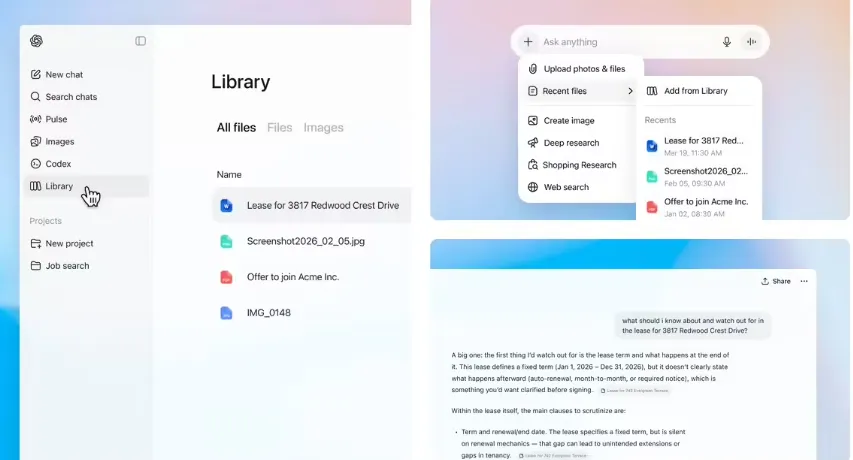
No longer just talking and passing on information, files now have a place to go
The core logic of Library is very straightforward: all the files you upload in the conversation are automatically archived by the system. Whether it's Word documents, Excel spreadsheets, PPT presentations, or various types of images, they will be automatically included in the Library space. When you need to use these files in a new conversation, simply click the attachment button next to the input box, select "Add from Library", and you can quickly retrieve them.
This change may seem simple, but it actually solves the key problem of AI assistants transitioning from "disposable tools" to "continuous workstations". A large part of the reason why users frequently switched between multiple AI platforms in the past was due to the fragmentation of file management - no platform can allow you to complete the entire process of "storage, retrieval, analysis, and creation" in one place. The emergence of the Library has added to this puzzle.
File tracking management, AI generated content independently classified
A noteworthy design detail is that the Library adopts a dual track management mode. The files manually uploaded by users are placed in the main area of the Library, while the AI images generated by ChatGPT are separately placed in the "Images" tab. This classification method ensures that content from different sources does not interfere with each other and makes searching more efficient.
For creators who frequently use ChatGPT to generate visual materials, this means that your AI image library has an independent "home" that won't blend with daily work documents.
Paid exclusive, privacy policy attracts attention
At present, the Library feature is only open to Plus, Pro, and Business paying users. In terms of privacy handling, OpenAI has taken a relatively cautious approach:
Dialogue and file unbinding: Deleting a conversation does not necessarily delete the saved files in the Library, ensuring data security.
30 day thorough cleaning mechanism: After users manually delete files in the Library, OpenAI promises to completely erase data from the server within 30 days. However, this 30 day buffer period has also sparked some discussions about compliance, especially in the context of increasingly strict data protection regulations such as GDPR.
For enterprise users who need to frequently handle sensitive business documents, this clear deletion mechanism, although not perfect, at least provides basic predictability and security.
From "Q&A Assistant" to "Personal AI Workstation"
From a higher perspective, the launch of Library functionality reflects OpenAI's clear strategic intention: to transform ChatGPT from a conversational tool into a digital productivity base for users.
When your core documents, historical materials, and AI generated content are all stored in ChatGPT's Library, the migration cost will significantly increase. This is not only an upgrade in functionality, but also a strategic layout in terms of user stickiness. OpenAI is gradually but firmly telling users that ChatGPT is not just a tool for casually chatting when you open a webpage, it is an indispensable infrastructure in your daily work.
For the AI industry, Library also sends a signal that file management capabilities are becoming a standard competitive dimension for AI assistants. Whoever can first enable users to achieve an integrated experience of "storage, calling, collaboration, and creation" on their own platform is more likely to have an advantage in the next stage of user competition.